
What's New in Rust's "Horse Equipment Update"
October 2019 turned horses into real vehicles with armour, shoes and saddlebags, added the Tesla Coil to the electrical system, and shipped a large pile of interface work - a redesigned death screen, map markers, and a crafting favourites system.
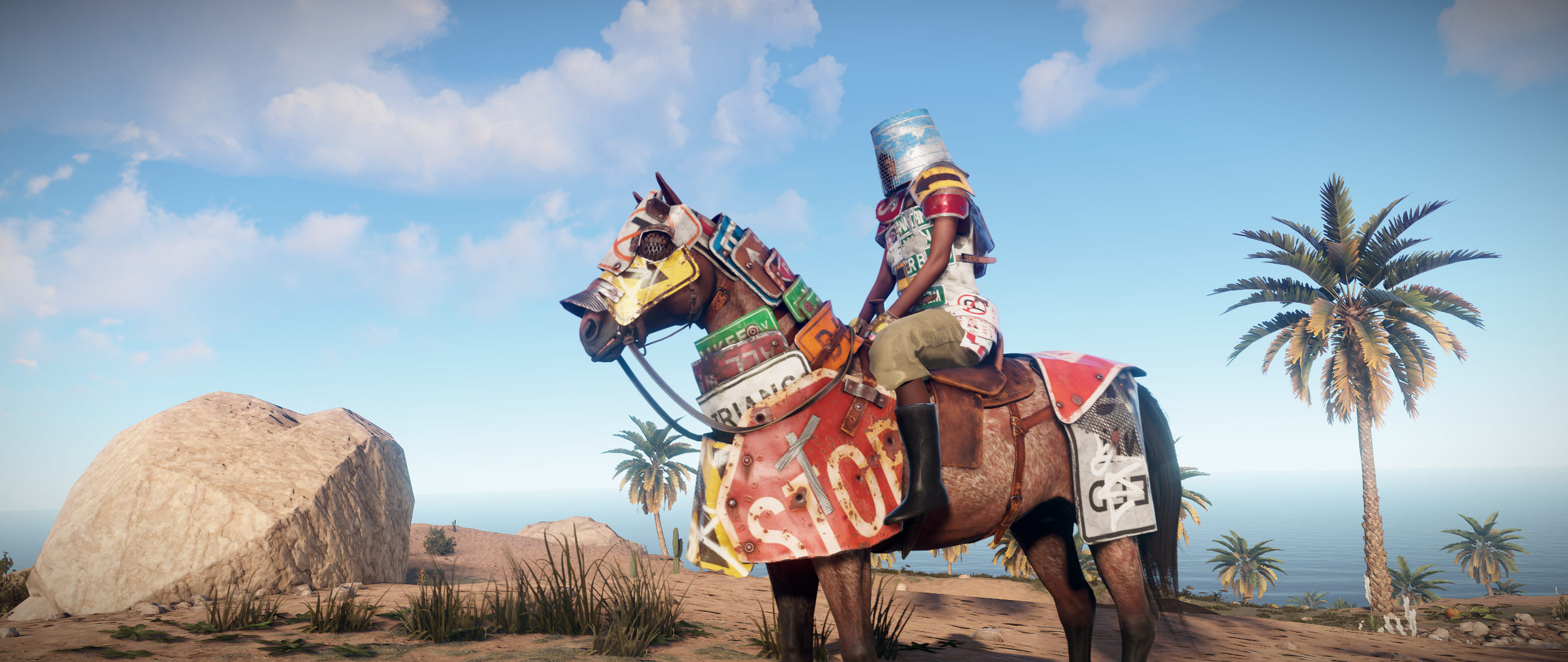
The Horse Equipment Update arrived at the start of October 2019, and it did two things at once. Horses stopped being a novelty mount and became something you could actually invest in, and the game's interface got a serious pass - a new death screen, map markers, and a crafting system that finally remembered what you actually build.
Horse equipment
Horse breeds now genuinely matter: max health and speed are affected by breed type rather than being cosmetic variation. Alongside that, horses got an information panel where you can fit them with equipment.
- Horse armour - both Wood Armor and Roadsign Armor variants. It protects the horse and also protects the rider from incoming damage. Facepunch acknowledged this isn't especially realistic and said outright that they didn't care - mounted riders should be feared rather than being sitting ducks. Importantly, the rider protection doesn't stack with your own armour; it reduces incoming damage by a percentage before player armour is applied.
- Horse shoes - straightforward movement speed bonus.
- Saddlebags - increase the horse's inventory size at the cost of reduced max speed.
Tesla Coil and electrical changes
The Tesla Coil joined the electrical component list with a simple pitch: power goes in, damage comes out. Feed it at least 10 units of power and it will also severely slow anyone caught in the arcing. Helk noted he had no real idea what players would end up doing with it.
Electrical wires got two improvements. There's now a flow indicator visible whenever you have Building Privilege and a wire tool equipped, which helps enormously when you come back to a large circuit and can't remember what you were doing. The wires also got normal mapping and specular highlighting rather than being drawn as flat black, so they read as actual 3D objects.
Weapon balance and ammo info
- Spas-12 - fire rate increased
- M92 - fire rate decreased
- M39 - now available at Bandit Camp
- L96 - removed from Bandit Camp, swapped out for the M39
- Shotgun slugs - more damage and better accuracy, but with a closer damage falloff
- Simple Sight - now a default blueprint
Selecting ammunition also now shows basic information about it. No stats were changed - the numbers were simply exposed for the first time.
The new death screen
This started as an attempt to put a map on the death screen so picking a sleeping bag would be more intuitive, and grew into a full redesign.
The new screen shows the distance you were killed at, where you died, and your teammates' current locations. Sleeping bags can be picked from the window at the bottom or clicked directly on the map, and bags clustered close together are merged into a sleeping bag cluster widget so you can pick one out of a group without fighting the UI.
Weapon names moved to localised strings instead of raw prefab names, so killers' weapons show up in your own language. Non-combat deaths got proper support too, with dedicated UI states for drowning, radiation, hunger and various edge cases.
Streamers got a specific accommodation: with streamer mode on, the respawn screen map is hidden by default and only shows while you hold the Map key, so an overlay bound to that key still covers the information.
Map markers
You can right click your map to place a marker, which also appears on your in-game compass. The marker persists across disconnects and, if you're a team leader, shows on your teammates' maps and compasses - yellow on your own HUD, blue on theirs. Right clicking the marker clears it.
Your last death location is also marked on the map, persisting until the next time you die. One caveat worth knowing: it stores the spot where you died, not where your corpse ended up, so if you died on a hill and your body rolled, the marker won't lead you to your loot.
Crafting and inventory quality of life
A large batch of interface work landed here. The headline is Crafting Favourites: hovering a craftable item in either the quick craft bar or the main crafting screen shows a star toggle in the top right. Favourited items jump to the front of the Quick Craft panel when you have the ingredients, and to the front of each crafting category. After favourite status, items are still ordered by most-crafted as before. There's also a toggle on the item information panel and a new Favourite category listing them all.
The rest of the crafting changes:
- A 0.75 second buffer when the Quick Craft list refreshes - clicking a different item to your previous one within that window is ignored, which cuts down on misclicks
- Right click an item in the crafting queue to move it to the front, resetting progress on whatever was there
- Right click a Quick Craft icon to remove it from the queue
- Middle click a Quick Craft icon to queue 5x, or as many as you can afford
- A new Electrical category, with all electrical items recategorised into it
Item splitting got faster too: right click the split bar to type an exact amount, shift-middle mouse drag to split a third of a stack, and middle or shift-middle click the splitter bar to snap it to half or a third.
Two more inventory additions. You can left click and drag your inventory player model to spin it around, right click to recentre, and disable the model entirely in the interface options if you'd rather have the frames back - protection info overlays still work either way. And new keybinds let you drop a single item or a full stack from either your belt or the inventory screen. These ship unbound on purpose, since accidentally dropping your gear is a bad first impression.
Repairing also got clearer: chat notifications now explain why an item can't be repaired, which had been especially confusing for recently damaged gear.
Oil Rig and Bradley balance
Facepunch had felt for a while that the Oil Rigs handed out too much loot for too little effort, so:
- Recyclers removed from both Large and Small Oil Rig
- Military and elite crates now only found behind keycard puzzles
- Easily accessible keycards removed
- Loot spawns slightly reduced overall
More indirect nerfs were promised as AI improved. Two scrap transport helicopter exploits at the rigs were also closed - one that parked the heli at an angle so its underbelly kill trigger would take out landing scientists, and a kamikaze approach that burned them.
The Bradley APC had a maths error that sometimes spawned its crates under the terrain, losing them permanently. That's fixed, and the crate loot table was improved to make the fight more worthwhile. Bradley is also now more vulnerable to HV rockets, and its secondary top turret is enabled so it can engage two targets at once.
The Excavator got a 30% yield buff to encourage more use, producing 5000 stone, 750 sulfur or 2000 metal fragments, up from 3000, 500 and 1500 respectively.
Exploit fixes and admin tools
A batch of client and server exploits were closed: the lerp convar exploit (the convar is now admin/dev only and clamped to a sane range), disarming landmines from any distance, freeing underwater loot crates from any distance, and interacting with the excavator from any distance. On top of that, you can no longer drag or throw items while wounded, and combining world items of non-full condition for a free repair was shut down.
God mode was improved for admins - status effects, food and hydration depletion, and radiation poisoning are all disabled in it - and two new console commands were added: refillvitals to top up health, calories and hydration, and heal, which is the equivalent of calling hurt with negative values.
Cinematography, screen settings and sound
Video creators got headlerp to adjust head snapback speed after alt look and headlerp_inertia to smooth that motion. Facepunch liked the second one enough to enable it by default for everyone. A grass.distance convar was also added to render grass and small decor further out - it can't go below the default and isn't recommended for normal play since it just hands you a disadvantage, but it makes footage look better.
Screen settings gained a screen mode selector (Fullscreen exclusive, Fullscreen Borderless, Windowed) and an FPS limit slider. If something seems off after changing them, the advice was to make sure you hit APPLY CHANGES and to clear out any old graphical workaround command line options.
On the audio side, bears got new sounds with weightier footsteps and much cleaner vocalisations, harsh ambient sounds and foliage rustles were softened, and collectible pickup and pressure pad sounds were redone. Attack helicopter rotors are louder with less volume fluctuation, since players were dying to a heli they simply couldn't hear, and both attack heli and Bradley MG sounds were beefed up. Barefoot footsteps were lightened in the high end.
One last visual fix worth noting: bullet impact glow on vehicle metal parts had never followed vehicle motion on anything except the cargo ship since cargo was added. It turned out not to be a decal system problem after all, and it's finally fixed.
The devblog also closed with a process note - September 2019 was the first month with Facepunch's new code review policy in place, prompted by the number of new programmers on the team. The expectation was not slower content, just more robust and better tested work.