
Rust Industrial Update Explained: Conveyors and Limits
February 2023 brought automation to Rust for the first time. Storage adaptors, conveyors and pipes let bases move items on their own, the Industrial Crafter builds things while you sleep, and Hapis Island was retired after nearly eight years.
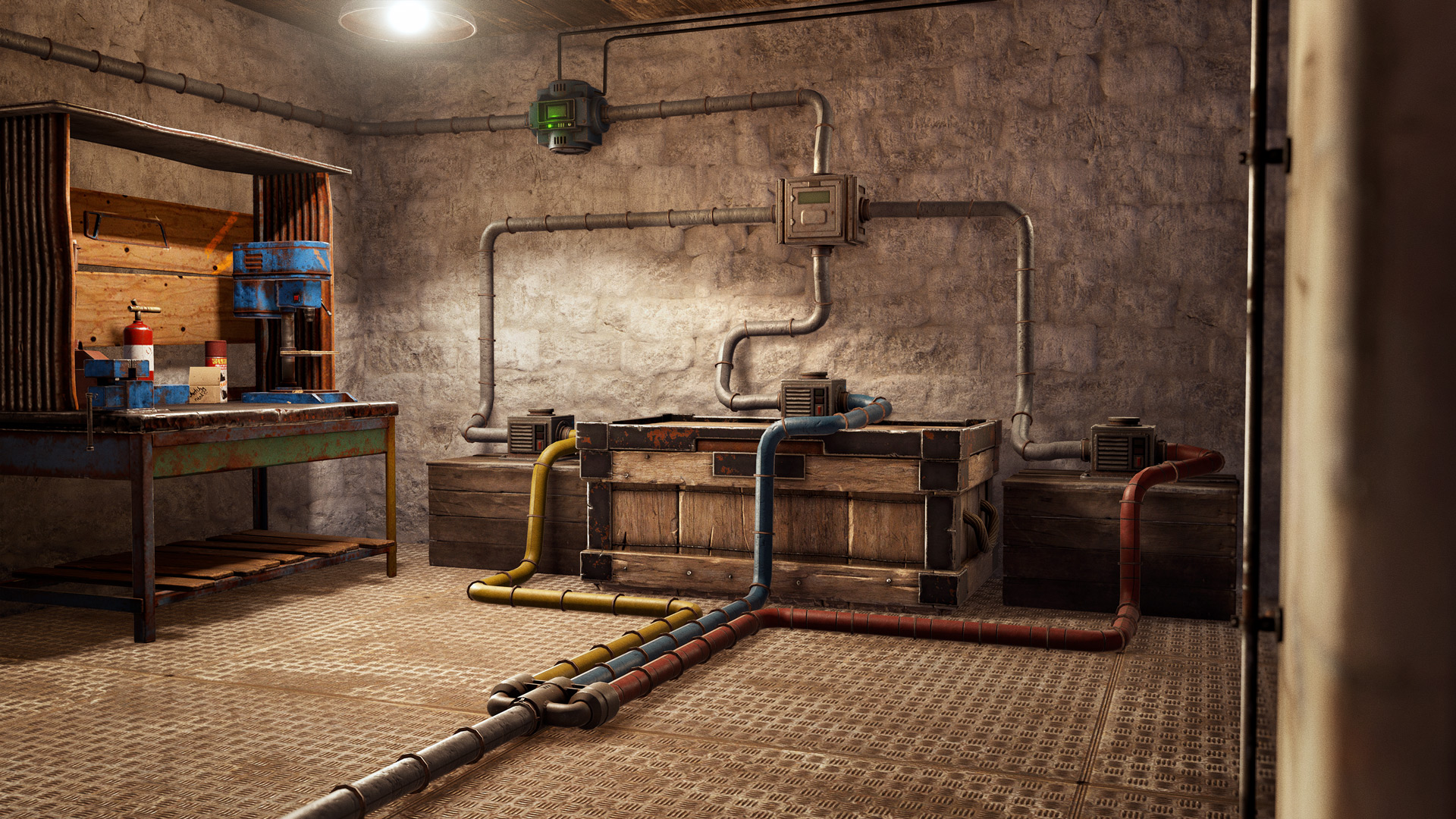
The Industrial Update (February 2023) added Storage Adaptors, Industrial Conveyors, the Pipe Tool, Splitters and Combiners, the Industrial Crafter and the Electric Furnace, so a base can sort, move and craft items on its own. At launch each conveyor could see at most 16 containers and moved up to 32 items from one stack per tick; the limits and the server settings that tune them are below.
The Industrial Update landed in February 2023 and it changed what a base could be. Up to this point every item in Rust moved because a player picked it up and put it somewhere else. This update introduced a full set of Industrial entities - adaptors, conveyors, pipes, splitters and an automatic crafter - that let a base sort, feed and manufacture on its own. It also marked the end of Hapis Island.
The Industrial system
Storage Adaptor
The Storage Adaptor is where nearly every Industrial build starts. Attach one to an existing storage entity and that entity becomes part of your Industrial network. It requires no power, and some entities have multiple slots where an adaptor can go so placement is less fiddly.
Adaptors generally use all inventory slots on the attached storage for input and output, with two exceptions worth knowing. On a furnace, input inserts into the Fuel/Inputs slots while output pulls from the output slots. On a locker, one adaptor only accesses a single partition, so covering all three means placing three adaptors.
Compatible entities are the Tool Cupboard, Large and Small Wooden Boxes, Small and Large Furnaces, Refinery, Electric Furnace, Locker, Fridge, Drop Box and Vending Machine.
Industrial Conveyor
The Industrial Conveyor does the actual moving. Once powered and switched on, it looks for items in containers connected to its inputs and divides them among its outputs. By default it will move anything it finds, but the filter system is where it gets interesting.
Each conveyor filter holds up to 12 entries, which can be specific items or whole categories like resources, components or clothing. With a filter assigned, only items passing those conditions get moved. Each entry can also carry quantity rules - a Maximum amount (don't send more if the target already holds over X) and a Minimum amount (only send in batches of at least X).
Conveyors also expose Filter Pass and Filter Fail electrical passthroughs that fire based on the conveyor's current state, so the rest of your electrical network can react to what's actually flowing through.
Pipe Tool, Splitter and Combiner
The Pipe Tool connects Industrial entities and will feel immediately familiar if you've used the Wire or Hose tool. Pipes come in four colours so you can keep track of what runs where. The usual distance rules apply, with two extra constraints: anchor points need a small gap between them, and pipes can't pass through building blocks or Vending Machines. They can pass through deployables like doors.
The Industrial Splitter and Industrial Combiner do what their names suggest. Worth understanding is how splitting divides: a conveyor feeding a splitter that connects to three boxes, sending 600 wood, delivers 200 to each box rather than 600 to each.
Industrial Crafter
The Industrial Crafter attaches to a workbench of any tier and crafts items automatically. Drop a blueprint into the blueprint slot, supply the materials, connect power and switch it on. It has built-in Industrial slots so it doesn't need an adaptor - conveyors can feed materials straight in and pull finished items straight out. There's also a Blueprint In/Out Industrial slot so you can swap what it's building programmatically.
It only crafts items appropriate to the workbench tier it's attached to, and it takes exactly as long as a player would to make the same item.
Electric Furnace
The Electric Furnace shipped alongside to complete the picture. It smelts at a slightly accelerated rate compared to other furnaces and runs on power instead of fuel items - which also means it produces no charcoal.
Limits and server options
Facepunch put guardrails in to keep Industrial networks from wrecking server performance. Each conveyor has a hardcoded limit of 16 container inputs/outputs, so on top of the usual IO max depth, it only sees the first 16 containers in its network. There's also a hardcoded cap of 32 items from a single stack per tick - larger stacks move gradually across several ticks. These were explicitly flagged as provisional, to be re-evaluated once real usage patterns emerged.
Server owners got three convars to tune things:
server.conveyorMoveFrequency- how often conveyors attempt a move (default 5s)server.industrialCrafterFrequency- how often crafters attempt to craft (default 5s)server.maxItemStacksMovedPerTickIndustrial- how many whole stacks a conveyor moves per tick (default 12)
Water IO performance
Large farms and Water Catcher networks had been degrading server performance for a while, and the diagnosis is a good explanation of how IO chains work. The expensive operation is an entity in an IO chain switching on or off. Water containers count as On when they hold water and Off when empty, so a chain of catchers passing water along produces rapid on/off cycling - each container turning on as it receives water and off as it passes it along - generating a flood of network updates and largely pointless IO processing.
The fix: water now waits 10 seconds before it starts draining out of a container. That lets each container in a chain build a buffer, usually 50-100 water, which preserves the same overall flow while stopping the constant state flapping. A small setup of three full barrels feeding a sprinkler used to send 10-20 network updates every few seconds; afterwards it sends none at all while running, and only a handful when it runs dry.
Water Catchers were also changed to deposit generated water as far down the chain as possible. With three catchers feeding a barrel, the catchers never hold water at all - it goes straight into the barrel. In a benchmark of 1000 interconnected water catchers, server IO used to become unresponsive after several minutes; with these changes it stayed instantaneous even with the server framerate artificially limited.
There's also an optional server.waterContainersLeaveWaterBehind convar that leaves one unit of water behind when a container drains into another, keeping it permanently On for a further performance gain. Because it changes functionality it's off by default.
Client performance metrics
Facepunch started logging client performance data this month and shared the first results, which are genuinely interesting reading. The immediate payoff was confirming, rather than guessing, that exclusive fullscreen delivered lower FPS than borderless.
Some of what the data showed:
- Rust is heavily CPU bottlenecked, and cache matters a lot - a 5800X3D averaged 50% faster than a 5950X
- Around 75% of the playerbase runs 16GB of RAM or less
- 73% of players are on 1080p, with only 2.5% on 4K
- GPU share: GTX 1650 at 6%, RTX 3060 at 7%, RTX 2060 at 5.5%, GTX 1060 at 2.5%, RTX 3090 at 0.6%, RTX 4090 at 0.2%
- 30% of players run motion blur, only 5% use SMAA, and 20% play primarily in windowed rather than borderless mode
- The Mac playerbase sits at 0.3%
The explicit advice was not to rush out and buy a better CPU on the back of the numbers, but also not to buy a new GPU expecting Rust framerates to jump. Next steps were expanding into gameplay metrics - most popular weapon per day of a wipe, win ratios in weapon matchups, deaths by team size, hourly loot per monument, least used items.
Unity 2021.3 and multithreaded networking
The client engine was upgraded to Unity 2021.3 earlier in the month. The rollout was bumpy, with the major issues addressed across several small patches. The upside is access to Unity's Burst compiler, which opens the door to moving existing Jobs system code to a much faster form.
The casualty was fullscreen exclusive mode. The upgrade introduced a bug that made it significantly slower than borderless fullscreen, so it was retired outright. The server build stayed on Unity 2019.3 for this month while testing continued.
Separately, multithreaded networking entered testing. It applies to client and server but the server benefit is much larger. Select official servers were running it this month with a view to enabling it everywhere the following month. Anyone wanting to test early could add the -networkthread startup parameter, with a clear warning that it was highly experimental.
Server query port sharing was also finally retired this month, after being flagged in the November and December devblogs. Owners still sharing their query port with the game port needed to update their startup parameters immediately.
Hapis Island retirement
The other headline. Hapis Island was permanently retired, nearly eight years after Petur first introduced it in April 2015 as a nod to the original Rust legacy map.
The reasoning was practical. Facepunch has no dedicated map design staff, and their mapping attention goes to procedural generation. Hapis had always been a side project built in Petur's spare time, and that time got scarcer as the team moved toward larger, longer-term features. Keeping the map fresh would need hundreds of hours, and it was already missing years of content - ziplines, subways, newer monuments, above-ground rail. Features that could be brought over often arrived a month or several late, and some, like the rail systems, couldn't be supported at all without internal tooling that didn't exist.
It wasn't presented as the end of static maps on Facepunch servers - the plan was to work with the custom map community to fill the gap.
Smaller changes
Codelock default options were rearranged, which is a small change you feel constantly. Doors used to show "Open" as the default whether or not you had the code, meaning you'd walk into a door, get beeped at, then hold E for the radial menu. Now the default depends on state: a freshly placed lock defaults to "change code", a lock you're not authorised on while you have TC auth defaults to "enter code", and an authorised lock on an unlocked door defaults to "lock door" so you stop leaving doors open.
Train wagon loot was diversified - wagons carrying crates now come in variants of differing quality, with better crate loot overall.
The changelist also cleans up a run of smaller issues: missing ceiling collision in the water treatment plant's "pigeon nest" building, code lock lights not showing through glass, aggressive rowboat LOD levels, incorrect notes on bass guitar and xylobones via MIDI input, and several admin tool fixes around spectating and kicking. Cinematics work got graphics.dof_kernel_count for depth of field blur quality plus graphics.disableParticleLod and graphics.disableAnimatorLod.
The month's Workshop skins leaned into the theme with the Industrial Craft Box, Corrupted Furnace and Tempered Small Wood Box, alongside the Wasteland Thompson. Current prices for all of them are in our skin tracker.